Skip to content
Stark Insider
  • Culture
  • Filmmaking/Tech
  • Atelier Stark Films
News Tech

Give Chrome for Android a speed boost (How to)

How to browse faster on your Android smartphone. Learn how to activate the Google Chrome server side browsing feature on you Android phone for faster performance.

BY Clinton Stark — 03.07.2013

Chrome Beta 26 adds autofill and saved passwords. But data compression may be the cherry on top.

Google has taken a page from the Amazon playbook and made available a beta version of its popular Chrome browser for Android that takes advantage of server side page loads.

Though this is an experimental feature, it’s worth checking out. Not only will web pages load faster, but due to a compression feature, the browser will consume less bandwidth. For those on capped data plans, this is most welcome news.

According to this post on the Chromium Blog announcing the new beta features (which also include saved passwords and autofill), “for an average web page, over 60% of the transferred bytes are images. The proxy optimizes and transcodes all images to the WebP format, which requires fewer bytes than other popular formats, such as JPEG and PNG.”

So how do you take advantage of data compression and all this new browsing speed.

First, make sure you have an Android phone. Well, okay, that goes without saying, right?

Three Easy Steps to Browse Faster on Android

1. Download the Chrome Beta 26 for Android using this Google Play link (you won’t find it using search) – Note: Chrome requires Android 4.1 or higher.

Next, you’ll need to activate the proxy feature. By default it comes turned off.

2. In Chrome Beta go to “chrome://flags”

3. Select “Enable Data Compression Proxy”
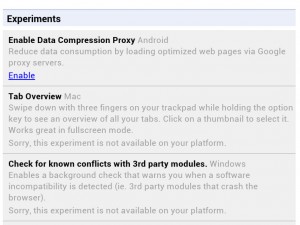
Go to "chrome://flags" and select "Enable Data Compression Proxy" to enjoy faster, bandwidth efficient web browsing.
Go to “chrome://flags” and select “Enable Data Compression Proxy” to enjoy faster, bandwidth efficient web browsing.

And you’re all set!

Give it a go. In our tests, page loads were noticeably zippier (though not necessarily every web site we tried).

We’ve yet to encounter any bugs, though Google warns this is still in beta (they love extended beta tests don’t they?). For the performance improvement, plus the other new features, we’re more than willing to stick with Chrome Beta as our go-to browser – if there’s ever a hiccup we can always pull up the stable version of Chrome since both versions can be installed simultaneously.

Tags:Android Google

Related Stories

Which Molty blind LLM study: a four-week single-blind crossover experiment testing whether users can detect the language model powering an always-on AI agent when the memory system stays constant. Results show no statistically significant difference across MiniMax M2.7, Kimi K2.5, GLM-5, and Gemma 4 31B.

Which Molty? Our Blind LLM Study Says Memory Beats Model

News
2026 Artificial Intelligence Index Report from Stanford HAI

Stanford's 2026 AI Index: Where AI Actually Stands (report)

News
Split-screen graphic showing Anthropic Cowork local file system and Google Personal Intelligence cloud services converging into the Integrated Personal Environment IPE.

Google and Anthropic Just Validated the IPE. Now Comes the Hard Part

News
Trifole film truffle hunting Piedmont Italy white truffles foraging tradition Gabriele Fabbro

Trifole: A Lyrical Journey into Italy's Ancient Truffle Tradition

Film Reviews

More in News →

Clinton Stark

Filmmaker and editor at Stark Insider, covering arts, AI & tech, and indie film. Inspired by Bergman, slow cinema and Chipotle. Often found behind the camera or in the edit bay. Peloton: ClintTheMint.

Short Films
Loni Stark - A West Coast Adventure - A Lifetime in the Making - Stark Insider

Stark Insider
  • CULTURE
  • BEST OF AI
  • FILMMAKING/TECH
  • ATELIER STARK FILMS
  • HUMANxAI SYMBIOSIS
THE STARK COLLECTIVE
  • THE STARK CO
  • STARK INSIDER
  • STARKMIND
  • ATELIER STARK
© Copyright 2005-2026 BLG Media LLC. v2.19.0
  • Review Policy and Shipping
  • Privacy Policy
  • Contact
  • About