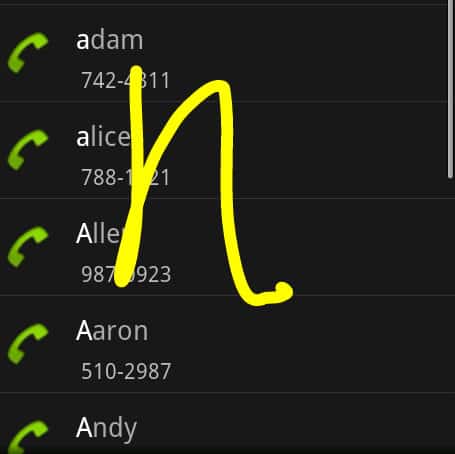
 Today, Google Gesture Search was made available (as part of Google Labs beta software) and here’s a quick preview of the new search technology. For those wanting the quick summary: it works as advertised, but doesn’t quite dazzle my socks off yet.
There are many great things about using an Android phone such as my trusty Droid. One of them is Google Voice, which is a tremendous productivity booster. It transcribes voicemails on the go, and gives me plenty of options on how to route calls.
But thanks to Google’s adventurous engineers it seems like a cookie jar of gadget goodies is always nearby. Recent fun stuff include Goggles (which lets you search the Web using pictures taken with the built-in camera), and Google Sky Map (an astronomer’s dream). Even something as utilitarian as Google Places Directory is well executed, and something I use on a regular basis.
So, what is Gesture Search? It’s an easy-to-use feature that uses your finger instead of a keyboard to search. This can be helpful when you need to find information quickly. And because it uses the full screen to capture your “finger writing” (aka gestures) you don’t need to squint or fumble with a tiny keyboard. The initial release supports searching of contacts, browser bookmarks, apps and music.
To use Gesture Search you must launch it like any other app.
It does not reside in memory and run automatically, which for me at least is a bit of an inconvenience. Instead, once it’s launched you’re presented with a blank screen. Much like etch-a-sketch for your finger, you can then start typing out a name for example. I tried to write “StarkSilverCreek” one letter at a time. I only needed to complete the first few letters and all sorts of search results started popping up including contacts and bookmarks.
I found the letter recognition to be spot on and quick.
Occasionally I needed to slow down though so the program could keep up. Then I had to speed up again when, for instance, I was putting a little dot above an ‘i.’ But once I got the hang of the pace it worked well.
A small area at the bottom of the drawing and search results area shows your search letters, one at a time. You can swipe right to left to delete a letter and “go back” a previous screen. This worked generally well, though I found it did not always recognize by backspace gesture motion.
I’m not sure how much I’ll use Gesture Search though. By clicking on the search button already built-in to my Droid I can swype (I have the Swype keyboard installed) a word for comparable search results (although not quite as inclusive). I wonder why Google did not integrate Gesture Search here, or provide the option to enable it. Perhaps a future release?
This is just a preview – more to come I’m sure on this and more things Android, Droid and all that is the beauty of open source platforms.
SCAN QR CODE
1. Open ‘Barcode Scanner’ (available from Android Market).
2. Point your phone camera at the screen, and scan the QR code above.
3. Follow the onscreen installation directionsINSTALL FROM MARKETPLACE
1. Go to ‘Market’ on your Android-powered device.
2. Select ‘Search’.
3. Enter ‘Gesture Search’ into the search field.
4. Once you’ve found the Gesture Search app, touch to install.
5. Follow the onscreen installation directions.